Lost horse recovery guide
Horsey Game Lost Horse Guide: Find the Horse
Use a short stable-and-identity checklist before you reload, edit DNA, or risk a valuable save.
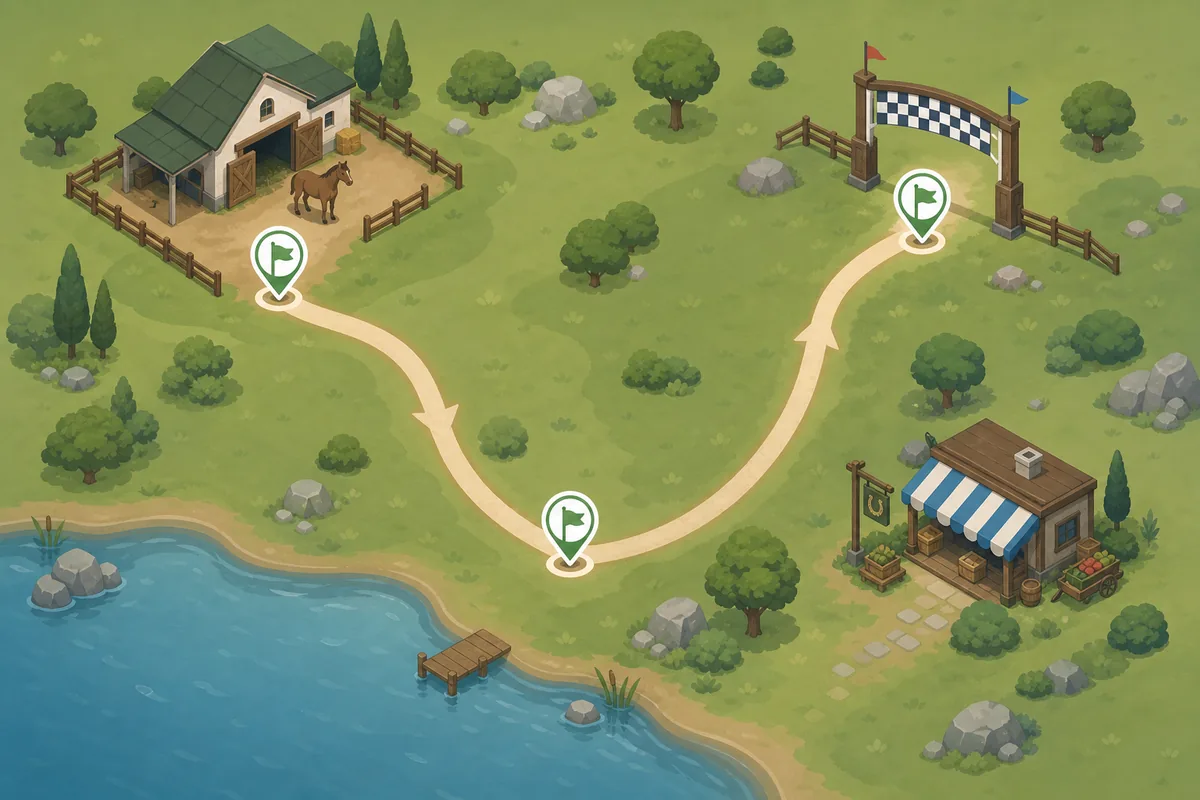
Fast answer
Start at the stable, then verify the horse
If you searched for Horsey Game lost horse, begin with the stable area near your home or ranch rather than immediately restarting the game. Community reports describe the objective as a recovery-and-identity check: the horse you use must be the one connected to the lost-horse situation, not simply any horse that looks close enough. The stable route is the first low-risk place to test.
Walk the nearby path once, return to the stable, and inspect the horse's visible name, appearance, and status. If the objective is tied to an achievement, look for a clear in-game response after the correct horse is present. Do not change DNA, install a mod, or overwrite a save while you are still unsure which horse the game expects.
This guide separates first-party media from community clues. Steam confirms the game context; player reports suggest where to look, but your current build and save decide what works.
Route
How to find the Horsey Game lost horse
Start from a landmark you can recognize: your home, ranch entrance, or the stable you normally use. The goal is to make the search repeatable. A vague sweep across the whole map makes it hard to tell whether the horse moved, the wrong enclosure was checked, or the achievement condition was simply not met.
First inspect the stable and the immediately connected path. Check both sides of fences, the entrance, and nearby open ground before traveling farther. If you use the map guide, treat its route as navigation help rather than proof that the lost horse must spawn on one exact square. The useful observation is whether the same horse, prompt, or objective state appears after you return to the stable area.
If the horse is not visible, leave through the normal route, complete one small unrelated action, and return once. Avoid mixing the retest with racing, breeding, DNA editing, or a new mod, because each extra change makes the result harder to diagnose.
- Start at home: Use a ranch or stable landmark instead of searching from an unknown corner of the map.
- Check the enclosure: Look at the stable entrance, fence edges, and the nearby path before traveling farther.
- Return once: Leave through a normal route, do one small action, and retest the same area.
- Change one thing: Do not mix the search with racing, breeding, DNA editing, or a new mod.
Identity check
Match the correct horse before using the objective
The most common mistake is treating a visual resemblance as proof. A brown horse, a similar body shape, or a horse standing in the right place may not be the horse the game associates with the lost-horse objective. Compare the name, visible traits, status panel, and any parent or offspring details your build exposes. If you have a screenshot or note from before the horse went missing, use it as a baseline.
A clean comparison is simple: check horse A, note the name and visible state, then check horse B without changing the location or task. If only one responds, record that result. If neither responds, the missing condition may be the route, build, or a separate trigger rather than appearance.
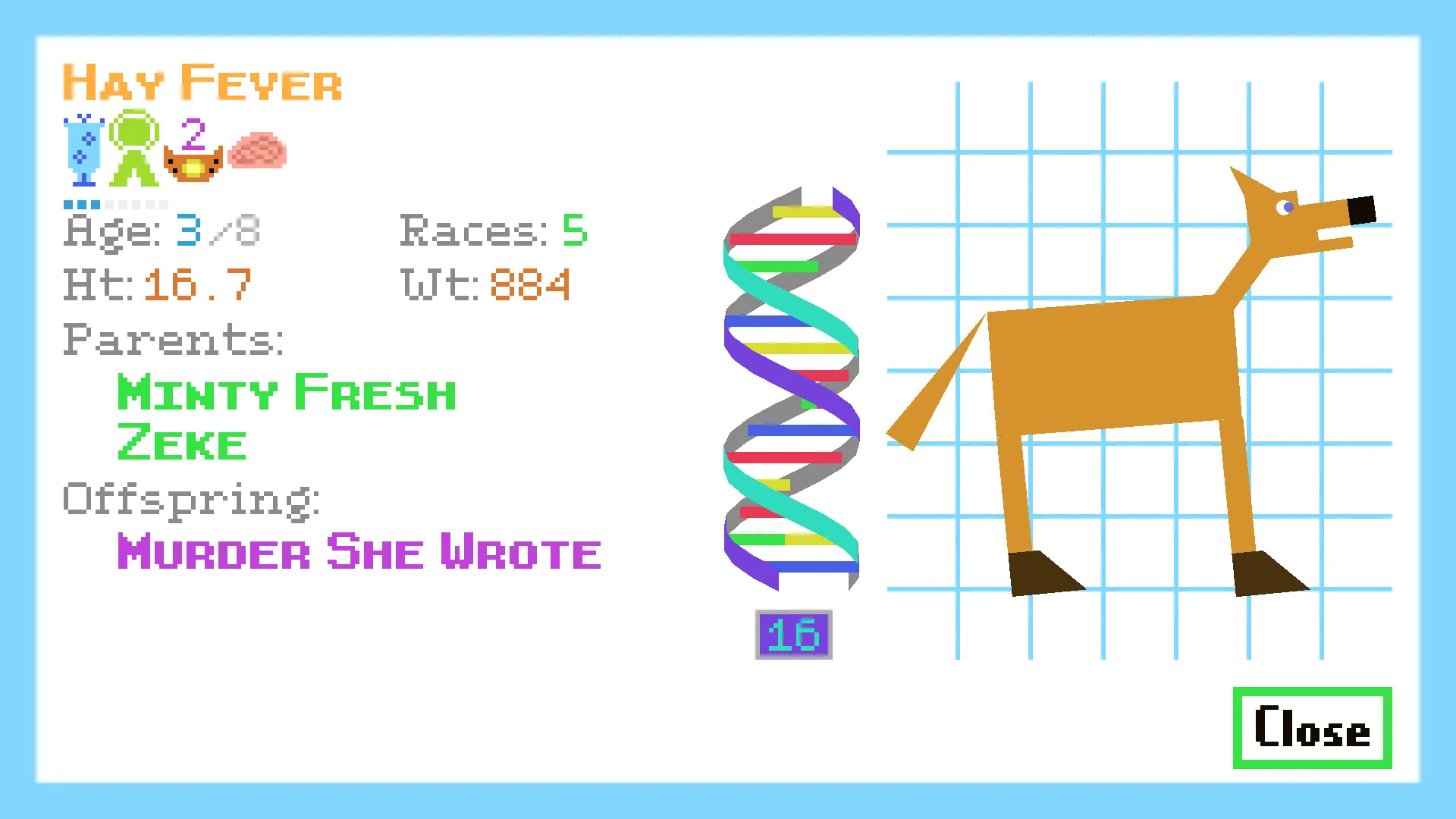
- Use the name: A matching coat color is weaker evidence than the horse name or current status.
- Compare one variable: Keep location and task fixed while comparing two possible horses.
- Read the current panel: Use the fields shown by your current build, not an old screenshot as a complete control list.
- Keep a baseline: Write down the horse state before testing an achievement or editing action.
Achievement
How to unlock the lost horse achievement safely
Once the correct horse is in the expected stable area, perform the smallest interaction the objective appears to request. Community guides often describe an exact-horse condition, and some players connect the step with the stable or a DNA/status check. Treat those reports as useful hypotheses, not a guarantee that the same button, prompt, or timing exists in every release.
Do not spend valuable resources just to force the achievement. If a CRISPR or inspection prompt is available, capture the horse's current state first, then use the prompt once and wait for a visible result. A successful trigger may be an achievement notification, a changed objective, or another in-game confirmation. If nothing changes, stop and return to the route and identity checks rather than clicking repeatedly.
After a success, make a dated save backup before experimenting further. The achievement should not require an unofficial executable, APK, cracked build, save editor, or unknown download; keep the game on its official Steam installation.
- Use the expected horse: Do not substitute a look-alike simply because it is already near the stable.
- Trigger once: Use the visible inspection or objective action once, then wait for a response.
- Watch for proof: Look for an achievement, objective, prompt, or status change instead of assuming success.
- Back up after success: Save a dated copy before testing mods, breeding, or DNA changes.
Troubleshooting
What to do when the horse or achievement is missing
If you cannot find the horse, return to the last known landmark and repeat the same route. Check the correct stable, fence edges, entrance, and selected horse. If the scene changes after a reload, record it before trying another fix.
If the horse is present but the achievement does not trigger, compare identity first. Verify the name or status, leave and return once, and test the visible interaction without changing the horse. If you used a mod or a DNA edit earlier, restore the clean backup instead of stacking another change on top of it. A reproducible clean test is more useful than a long list of guesses.
If a crash, update, or Steam Cloud conflict happened before the horse disappeared, protect the current files first. Do not delete the only copy, accept a sync conflict blindly, or download a so-called lost-horse fix from a mirror.
- Repeat the route: Return to the same stable landmark and check the same objects in the same order.
- Protect the files: Make a dated copy before accepting cloud changes or testing a mod.
- Restore cleanly: If a change caused the problem, return to the clean baseline instead of adding more changes.
- Report context: Include platform, build, stable location, horse identity, last action, and visible result.
Decision table
Lost horse symptoms and the safest first check
Use this table to decide whether you have a route problem, an identity mismatch, an achievement trigger problem, or a save-risk problem.
| What you see | Likely explanation | First check |
|---|---|---|
| The stable is empty | Wrong enclosure, route, or scene state | Return from a known landmark and inspect the same stable again |
| A similar horse is present | Appearance does not prove identity | Compare name, visible traits, and status before acting |
| The horse is present but no achievement appears | The objective condition is incomplete or unverified | Use the visible prompt once, wait, then repeat the clean route |
| The problem began after a mod or edit | The save baseline may have changed | Restore the dated clean copy before further testing |
| A site offers a lost-horse fix download | Unsafe unofficial-download intent | Ignore it and use Steam plus a verified save backup |
Workflow
A safe Horsey Game lost-horse recovery loop
- Mark the baseline Note the last known location, horse name or traits, platform, and the last successful save.
- Check the stable Start at home or the stable landmark and inspect the enclosure, entrance, and nearby path.
- Match the horse Compare identity and status instead of accepting the first horse with a similar appearance.
- Trigger once Use the current visible inspection or objective action once, then wait for an achievement or state response.
- Protect the result Back up after success and restore a clean copy before testing any mod, breeding change, or DNA edit.
FAQ
Horsey Game lost horse FAQ
Sources and media notes
First-party and community references
- Official Horsey Game Steam store page - Official game page and store media used to identify the game context and horse-status presentation.
- Horsey Game Steam community achievements - First-party Steam community surface for achievement context; it does not replace an in-game trigger test.
- Horsey Game community lost-horse discussion - Player report used as a clue about horse identity; community advice is labeled as unverified and build-dependent.
- Horsey Game speedrun forum thread - Community route and objective discussion checked for search-intent coverage; not an official universal instruction.